
After awhile, note taking systems tend to reach a point where you forget what you’ve got. Sometimes, though — we want that stuff back. There are a couple of ways to accomplish that, and LLMs are one of the newest.
But first, a reminder: forgetting is natural, normal, and healthy. There’s a fancy term for it in child development: synaptic pruning1. But before you can prune, there must be something there. Something that was useful at least once, generally. The question is… when it might finally be useful, will you be able to find it again?
Knowledge bases grow and then shrink
A newborn baby’s brain grows a ton — early brain development involves explosive growth, similar to the burst of enthusiasm many folks felt at the beginning of the pandemic when personal knowledge management as a movement began to really take off. The contents of my Obsidian vault grew exponentially as I filled it with everything I needed to offload from my blurry mom-brain so I could still do knowledge work — mostly wrestling with the nerdy academic research I was digging into because I wanted to create a plausible and interesting fantasy world for the book I was writing while my son took naps.
Then he got older, I went back to work, and I took fewer and fewer notes — but the collection was still useful. I’m extremely glad I curated its contents; I rely on the information there daily, even though I don’t take as many notes as I used to by any stretch of the imagination. There are a handful of topics and files that I refer back to almost constantly, others I refer to only regularly — like my potty training notes, reflections on previous Thanksgiving meals, or idealistic plans for what I’d like my retirement to look like. And there are, of course, notes I made once and never really touched again, because my life changed — the odds of me teaching US history in an environment where I need to worry about structuring a classroom lesson with careful differentiation according to student reading levels are exceptionally low, for example.
When a child hits 2 or 3, the number of synapses in their brain peaks — and the brain starts to remove synapses it doesn’t need anymore. It ‘forgets’ skills and knowledge that haven’t been used enough to justify the cost of keeping.
There are methods to combat forgetting, of course — formal spaced repetition practices are the most popular, although I prefer to think of it as ‘structured serendipity’ since I’m not usually trying to memorize. According to my Readwise database, my personal peak streak for flipping through flashcards of things I wanted to see again later is 121 days. I’ve been considering setting up a flashcard system for memorizing the Pokemon type chart, because my son is a lot more pleasant on hikes if there’s the promise of spinning a Pokestop every half-mile or so… but he doesn’t like to lose battles and he’s a little too young to grasp the complexities himself yet.
Like my son, my notes collection is about 4 years old at this point, and I can attest that I’ve done more ‘pruning’ than adding in the last year or so — I moved the finance stuff into a shared drive with my husband, my work stuff now lives in a shared Notion database with my work colleagues, I’ve deleted a bunch of PDFs that are no longer relevant to my interests, I’ve archived old books I no longer have an interest in finishing because I no longer aspire to the rarefied heights of “traditionally published author” or even the grind of “successful self-published author.”
Notes are valuable resources
But as with the Pokemon type charts, I created most of my notes for a reason. Pulling from my own notes accesses vetted sources instead of the wild world of the internet — I know I liked it enough to read it, if nothing else. But that’s certainly not the only value: the latent connections between my thoughts and my notes are easier to find if I only need to refresh my memory, not re-learn the thing with different sources that might not align to the overgrown pathways in my brain.
A curated notes collection saves time, and it’s efficient, particularly in an era where internet search is badly broken and even when LLMs don’t hallucinate like crazy, they often lack context.
Taking notes is easy, especially if (as with my types chart) you don’t bother to re-write everything into your own words. Using them isn’t even that hard, really — even if you only vaguely remember what you’re looking for, there are a bunch of ways to find stuff again. Most tools have some kind of search function, whether it uses semantic search, boolean operators, database queries, regular expressions, natural language search… or isn’t called search at all but relies on up-front organization; stuff like naming conventions, backlinks, structured data classification systems, tagging schema, folder systems… it’s generally straightforward to lay hands on an old note. As far back as twenty years ago, browsers kept searchable histories and helpfully changed the color of links that had already been clicked. I know people who still rely almost entirely on their browser search history as a “notes database.” If a method ain’t broke, why fix it?
The hard part is finding useful things when you’re not looking for it, and that’s where the technology has really improved a lot in the last year or so. Little AIs that live in the corner of your screen, ready to helpfully pop up with a reminder that you already started writing an almost identical article two years ago. Services that get to know you and algorithmically serve you content they think you want, when you want it — memetically offering you coupons for diapers before you even know you’re pregnant. Plugins2 that index your notes, perform magic I barely understand — like vector embedding — and tell you what you’ve got that’s similar to what you’re currently looking at.
The frustrating part of this new technology is that it’s not set up for the careful systems I created three years ago; vector embeddings are made using the contents of your notes, so if you embedded content that is only rendered by a particular program — to avoid redundancy, perhaps — you’re kind of3 out of luck. Worse is if you use consistent templates — if you’re writing chapters of a novel, for example, vector embeddings will get you similarly structured chapters instead of notes relevant to the content of what you’re writing, unless you’re very careful about only indexing certain subsets of your notes. This is maybe not what you want to do if you, for example, want to see other chapters touching on similar themes and also nonfiction notes about that theme, without weighting every chapter that involves particular characters. Vector embeddings are helpful, but they aren’t as ‘smart’ as all that, alas.
A well-trained LLM levels up search
Historically I haven’t used Notion for anything non-collaborative. It’s slow to load. I don’t really like databases, and I don’t like the way it ‘pushes’ me to add icons and banners to everything. Most importantly, I find the way its block-based structure interferes with a simple cmd+a “select all” immensely frustrating. While I’m venting, concatenation and tracking word counts is all but impossible unless I do it manually? Ugh. Plus, the keybinds suck.
The AI, though, is incredible. Being able to feed my unrefined database of raw highlights and annotations to the workspace, do no setup beyond clicking a handful of consent buttons, then ask a question like “show me all of my notes about infrastructure that might pair well with this point I am making about how Fall of Angels is a fantasy novel that teaches a lot about infrastructure” (stay tuned for that forthcoming article sometime next spring 🤪) and get… useful results, neatly organized into a brief memo, with footnotes sourced to my own personal notes, complete with a carefully curated list of (in this case 14) additional related notes is… incredible.
Seriously, I am sufficiently blown away that I’m going to just share a screenshot of what that slowly growing note looks like, even though it’s messy and disjointed and raw and ugly and probably gives too much of the game away.

The NotionAI is terrible at many things. If you try to use it to create a database property for automatically counting words in a document (which should be table stakes, imo) it hallucinates wildly and is wrong by orders of magnitude. If you ask it whether a particular chapter of a story has a coherent beginning, middle, and end, it cannot tell. It has most of the same painful conversational pitfalls as ChatGPT, which makes sense because as far as I know, Notion’s AI is essentially a wrapper of GPT-3.5.
But wow is it convenient, and whatever the Notion team has done to get it to answer questions like “find me notes about…” really, really works. It’s always well-sourced, which is what matters… and it manages to find hidden gems I had completely forgotten about — although I absolutely cannot trust it to accurately report on the status of those things, and it definitely gets some nuance wrong. For instance, I asked for books and of the three bullets, only one is a book instead of an article. Plus, I already wrote that “Infrastructure in Ancient Civilizations” article it says I could develop (although I had completely forgotten about it) — compare the actual content of my note to NotionAI’s report on it.

Now, sure, if I search the raw term “infrastructure” with old-fashioned search, I get twice as many results. But they aren’t as useful as even a quasi-accurate memo. Compare:
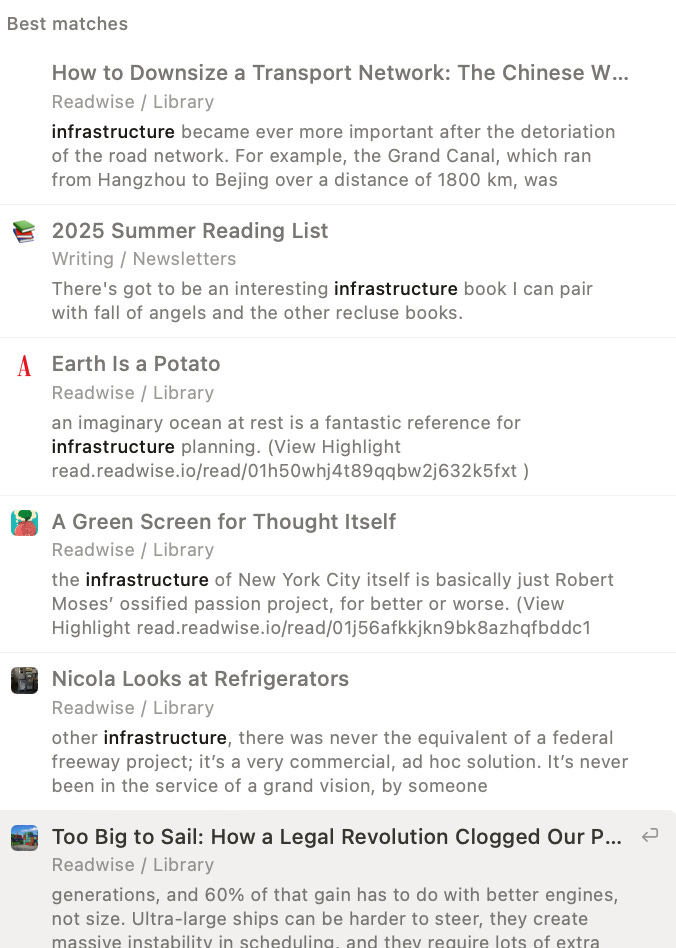
Of my top results, only one is in any way useful in any way to the project at hand (that Chinese transport network thing, which I definitely forgot about entirely until now), and it showed up in the curated list of 14 the AI gave me. The snippet of text that’s displayed isn’t clearly connected to anything I’m thinking about, and it takes a lot more mental effort to sift through and remember why it might matter.
I ought to figure out how to do this in Obsidian too, but honestly… that is up there with training my own LLM model in terms of “probably a good idea, don’t really have time.” I’m just glad that LLMs have leveled up search, because as Google’s dominance in the last era of the internet demonstrates — search is key.
Midjourney makes beautiful images, and Elevenlabs seems to have nailed text to speech… but for me search, and summarization, are the killer use-cases for AI — which is why Elicit (which automates time-consuming research tasks like summarizing papers, extracting data, and synthesizing findings) has historically been one of the apps I point to when people ask me what AI is even good for, anyway.
Yeah, there’s lots of hype — but I truly believe that figuring out how to leverage large language models for search is as key to success in the current era as learning boolean operators was 20 years ago.
Here’s the basic primer on synaptic pruning I used as a reference while writing this.
The one I use for Obsidian is called Smart Connections, but as nice and helpful as the developer is, sometimes I feel too stupid to get the most out of it.
Although Obsidian does have plugins like ‘easy bake’, which will take embedded content and copy or move the text — and it’s possible to create code scripts that do the same thing in more custom ways. Even I’ve done it with javascript or python and some kind help, and I’m no coder — tools like Copilot and ChatGPT’s strawberry model make this even easier now. Thanks to ChatGPT, I managed to install homebrew in the terminal without asking for help, after bouncing right off the documentation I found using Google…
Enjoyed and agreed with raves and rants. We're in that awkward space between new tech rollout and UI's that make the tech understandable, not to mention useable.
Every couple of months I install Smart Connections and end up cursing. I'm not stupid, we shouldn't be made to feel that way, and I refuse to use products with lofty pitches that do not deliver like this one - Spend less time linking, tagging and organizing because Smart Connections finds relevant notes so you don't have to!
I am currently indexing all of my documents locally using GPT4All and Meta's model Llama 3 8B Instruct. If it works well, then I'll try out the Obsidian plugin Copilot for Obsidian which can call the above model in GPT4All, keeping everything local. (Bad product name: It has nothing to do with Microsoft's Copilot). Fingers crossed. If you're interested in some eye candy, here's the dev's latest video: https://youtu.be/1jSaGwuPiJs