
I am not what one would call a “terminal native.” The first time I tried to install Claude Code a few months back I hit a (known, documented on the repo) bug and couldn’t get it to work. I managed to figure out some cool workflows with MCP servers but they weren’t effortless. AI was saving me some time but only on very specific tasks, and the rest of my attempts tended to be hit or miss.
But recently the word came down from people I trust —1 people with skin in the game — that the coding agents had turned a corner and that Claude Code was the perfect mix of powerful and accessible for someone like me.
I tried it out and hot damn y’all, it feels so good. The UI feels so intuitive, like an old-school MUD. The most annoying thing — the permission management — had good solutions on the issues pages. The scripts it spits out work. It made me an entire new Obsidian plugin in one go, with literally one bugfix (it wasn’t properly stripping white space in the token). As someone who has painstakingly built Obsidian plugins before, I assure you this is much better than my code usually turns out on the first try.
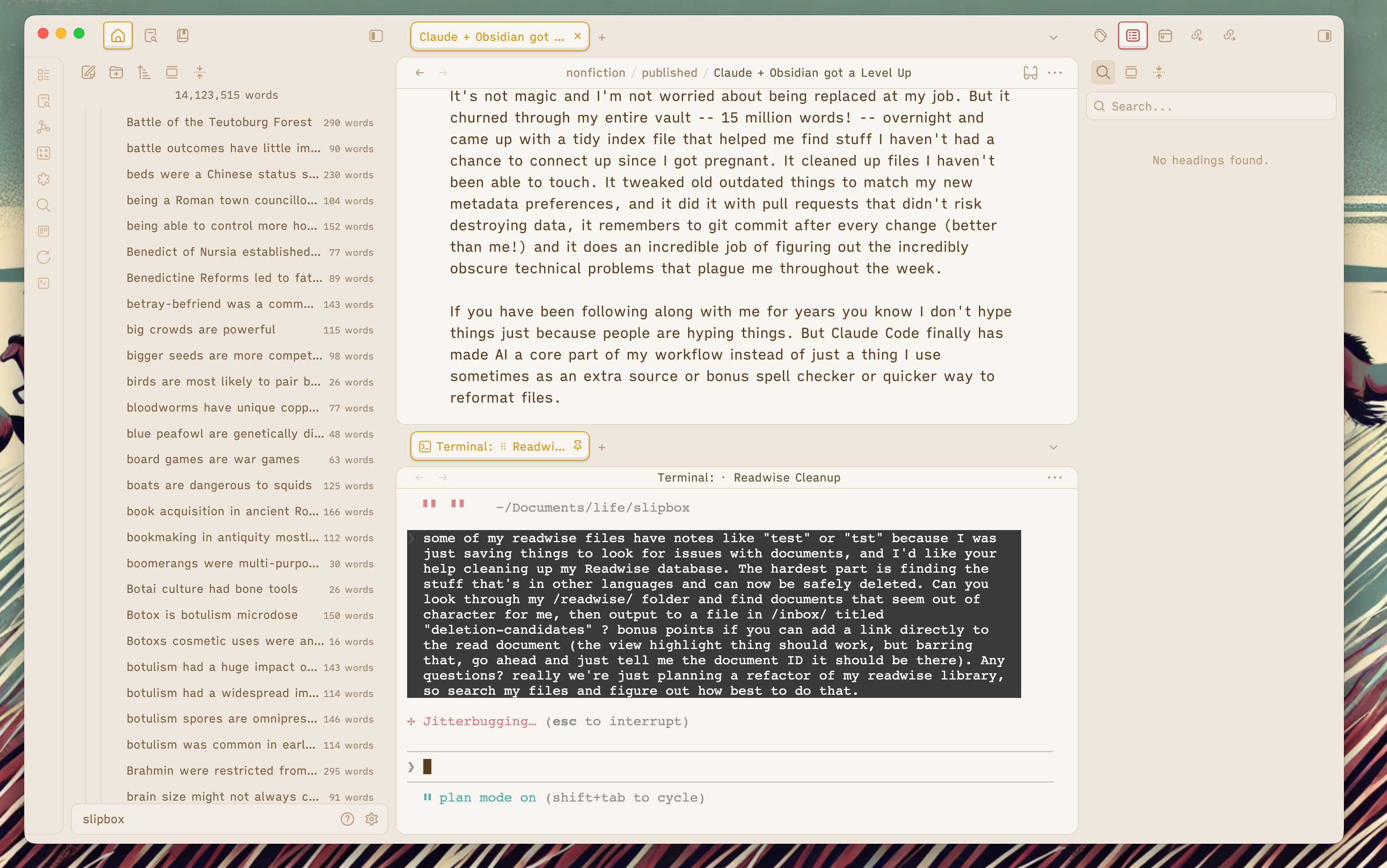
Iterations actually fix the stuff I didn’t articulate well the first time, and the way it collates data from different sources — stuff I used to have to click through long loading screens to get before — is saving me so much time.
It’s not magic and I’m not worried about being replaced at my job. But it churned through my entire vault — 15 million words! — overnight and came up with a tidy index file that helped me find stuff I haven’t had a chance to connect up since I got pregnant. It cleaned up files I haven’t been able to touch, and fixed a glitch in my RSS plugin that was causing ugly character encodings to get scattered about in URLs and file names. It tweaked old outdated things to match my new metadata preferences, and it did it with pull requests that didn’t risk destroying data, it remembers to git commit after every change (better than me!) and it does an incredible job of figuring out the incredibly obscure technical problems that plague me throughout the week.
If you have been following along with me for years you know I don’t hype things just because people are hyping things. But Claude Code finally has made AI a core part of my processes instead of just a thing I use sometimes as an extra source or bonus spell checker or quicker way to reformat files.
Setting Claude Code Up in Obsidian
I was genuinely surprised at how easy the terminal plugin was to install for Obsidian. In Obsidian, I went to community plugins, searched for “terminal,” and installed the Terminal plugin by polyipseity. Then I clicked the “open terminal” button on the left-hand side. That’s it.
There’s a dedicated Claudian plugin (subtly different from the Claudsidian solution people), but the Terminal felt a little higher fidelity to how I’m used to doing things, and a little simpler to understand. Plus, Claudian looks great but honestly I don’t think I can live without plan mode, which the readme says it doesn’t currently support. Plan mode is nice because it asks questions, really thinks things through, and can be trusted not to do dumb destructive things.
But Why?
One criticism I see of LLM tools is that people will say “well I could do that by hand, why do I need a bot to do it for me?” And for a lot of people, this is true. They can spin up a bash script that works faster than Claude — but I can’t. Even I can run multiple searches in Obsidian faster than it takes an agent.
But these days I’m not generally trying to do things faster, I’m trying to do them with less attention. All these searches and tasks run in the background, which means they actually get done. When I had to actively sit there and click through things, half of it never happened because something else more important would come up, or I just didn’t feel like doing grunt work just then.
It’s very similar to how I felt about Obsidian plugins, honestly. Back then, I could feel all these different ways of optimizing and improving processes just on the tip of my fingers and I just needed to do them. I built a concatenation plugin, I made a theme. I got a lot out of that — including a great new job with Readwise! — but I had definitely plateaued in terms of what optimizations could actually make my life better, because learning to code was a commitment I did not really have time for.
Now, though, I’m excited again about all the ideas I have for improving my life. Some of them will end up not getting used as much as I hope (am I going to finish this webserial? I do hope!). But I am sure I will find new ways to be more productive by reducing the amount of context switching and waiting on loading bars I need to do. I’m already finding better ways to batch my tasks. Making smarter to-do lists that include more context and don’t require me to learn Reverse Polish Notation. Suddenly, I can actually make use of the APIs I’ve always known existed. The sky is the limit once again — and I don’t need to bother my friends to get stuff done.
Back when I first learned about Eisenhower matrixes (thanks again to the Obsidian community!) I was utterly befuddled by the “delegate” box. Who was I supposed to be delegating tasks to? I was a stay-at-home mom, not a general or CEO.
But now that I have kids, I delegate all the time. My six(!)-year-old can handle the laundry, so I leave that for him. My two-year-old loves clean-up time, so I hold off until she’s home. My babysitter likes to tidy things (“it’s better than doomscrolling Instagram”), so I can ask her to reorganize the kids’ closet while they’re napping, instead of doing it myself. My husband isn’t afraid of heights the way I am, so I ask him to change the stairwell light bulbs when they go out.
Building the habit of delegating — and using language clear and precise enough for a teenaged girl who doesn’t live in my house to understand — has really helped with leveraging LLMs.
My favorite kind of problem is a solvable problem. I know a lot of people who just brute force or deal with their issues, but I try to notice pain points and deal with them. This isn’t just an AI thing, this is a life thing. For instance, I was working on a puzzle with my son, which I often do, and I realized that one of the big problems we have is being able to see the little guide picture. Some of my friends call this cheating, but my son is six, so whatever. Anyway, normally I lay the poster thing out on the table, but then we don’t have enough room for all the pieces when we’re first getting started. I had this epiphany that I could put it on the wall, with a clip. And yeah, yeah, it’s a little janky — a perfectionist (like the guys I studied when reviewing The Perfectionists by Simon Winchester) would have a nicer solution here — but this gets the job done and is nice and easy to reference.

This is not going to 10x my puzzle productivity. But it makes the process nicer and saves some frustration.
Build a habit of noticing things that frustrate you! Instead of stoically tolerating them, go for a walk. Try to figure out and brainstorm your pain points. Let your mind relax while noodling on the topic of how to improve your situation.
I do all my best work outside.
An Example: The Telegram Bot
This is one reason I wanted an easy quick capture system for Obsidian that felt natural, like chat. When I am out for a walk I hate opening up the GitHub app and finding my notes to edit, and I’ve always had issues with quick capture + Obsidian Sync because I make big folder changes to my vault all the time. Sync under those circumstances is hard. So I asked Claude what I should do and it suggested Telegram because it has a good bot system. I set up a Telegram bot (which was indeed super easy) and asked Claude to build me an Obsidian plugin to copy messages to my inbox — it worked after one bugfix. I know I could just use a script, but Obsidian’s plugin graphical interface makes a little more sense to me. I don’t want to worry about automated scripts running in the background of my computer. I would have to go and learn where all that stuff lives before being able to disable it — whereas I’m already comfortable with Obsidian plugins.
Most of this article was drafted in Telegram messages over the course of the last week. I just dictate into my phone using the microphone on the google keyboard. Some people prefer fancy AI transcription services, but I need to see the words appear to remember what I already said, and this method is free :P
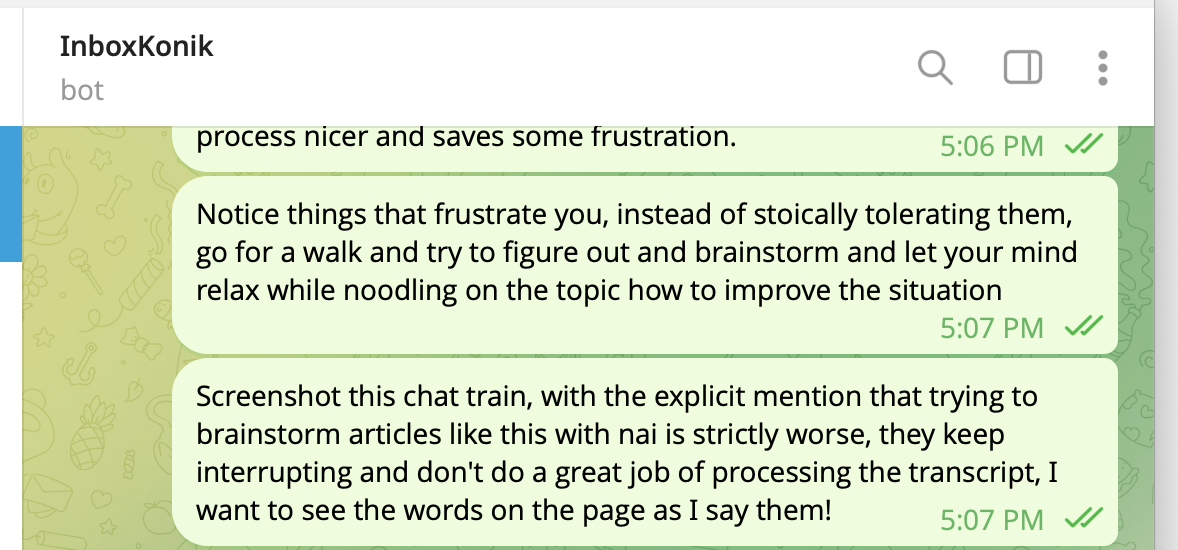
And yes, I know Obsidian’s plugin ecosystem already has a Telegram plugin, but I don’t like to use daily notes and the one Claude built for me is simpler to use and customize according to my preferences.
I’ve always been better at knowing what can be built than knowing how to build it. Asking an AI for something at about the complexity I would be willing to tackle is like asking for help with a project in Discord. That is about the level of complexity Claude excels at, and I have a lengthy backlog of those. Like this cool website it built for my Beauty & the Beast in SPAAAAACE! webserial, Maven and the Border Lord (which automatically updates whenever I post to the decentralized Instagram-alternative I use, but I’ve been having some trouble getting Midjourney to generate what I want. Maybe I should try nanobanana :P).
Why Claude
I’m all in on Claude (which you may remember I was loving back in July, too, because it let me organize my book review notes much better) because Anthropic seems to be leading in the stuff I care about. The harness they’re building makes sense to me, and I like being able to look inside the box at the files that control it. I think I’m more in their target audience than the other LLMs I’ve tried, and I hate switching everything over to stay on the cutting edge when a new model or tool drops.
Also Claude Code is cheaper than the API via Cursor, and the models diverge a bit so getting good at one seems like a better call than optimizing for everything. My friend Jay Fowler is trying to get them to do more custom complex stuff so he uses both but it’s a lot of effort (and money). I don’t only use Claude, though. Readwise Reader uses OpenAI models for Ghostreader, which I use all the time because Readwise’s development team has done way more work with prompt engineering and vector databases than I could ever dream.
As for the privacy concerns? There isn’t anything private in my vault, so I don’t really care about Anthropic access. I mean, most of it is on my public slipbox. I keep my truly private information analog or in a Bitwarden locker. Also, I trust Anthropic a bit more than some of the other big AI players: their business model makes sense to me and doesn’t seem like it would benefit from dark patterns or grand betrayals.
A big value of my notes is not really remembering stuff per se, but rather having them in a format that is easy to share and provides all the context that would be annoying for me to rearticulate. This is a reason I write articles; they help keep me from repeating myself. So most of my notes are intended for sharing in some form anyway, and if Anthropic decides to source me in an LLM response, I’ll be as delighted as when Google does.
Terminal Practice with Games
Some folks I’ve talked to are a little intimidated by the terminal. Want to practice in a low-stakes way?
Go play Lusternia. Yes, it’s in maintenance mode, but it’s a fantastic game with incredible depth of lore and wonderful stories, and it’s all done in a terminal-like interface. Games are the best way to learn. Not fake games, real games. Getting stuff done in Lusternia when I was a kid required scripting (MUDs are how I learned what little I know about coding) and in the age of AI... trust me, you’ll be fine.
Incidentally, Lusternia is a social game, and I admit that I haven’t played it in a couple of years. Nothing prepared me for this moment better than that game, and if any of you end up playing, let me know, because selfishly I would be delighted to get back into it.
IDEs vs Obsidian
You can use the terminal plugin directly in Obsidian if you want to use Claude. But if you’re messing around with dotfolders (where Claude’s settings and slash commands live) or want to look directly at your Claude commands, having a “real” IDE is nice. I personally use Cursor, which is a fork of Visual Studio Code, but mostly just because I didn’t want to take the time to figure out what weird UI stuff I did to my VSCode, and I happened to have it installed because I was testing something for the Readwise MCP server. Cursor also does some neat stuff with RAG and vectors that I don’t understand but assume will come in useful at some point.
Obsidian has by far the better “normal” file editing (as opposed to code editing) experience when working with Claude, and it not only has plugins but you can also make your own to do whatever you want and interact with it with a graphical interface with toggles and stuff. Honestly there isn’t much you can’t do with Obsidian. It’s crazy powerful.
I bounce back and forth between Obsidian, Cursor and the external terminal (which Obsidian can launch with a command palette option if you have the Terminal plugin installed). The main thing to keep in mind for both is that large file changes kind of require a restart because the cache gets stale. In my experience Obsidian handles this a little better.
Little Tips for Claude Code + Obsidian
You can put your Obsidian vault into a “top level” folder, then when the terminal opens, use
cd ..to navigate “up” one level in the tree. This is the Wikipedia page forcdwhich is essentially the only terminal command I have memorized. But if you get into this habit (or make it your default terminal behavior, ask Claude how!), you can put other folders (like git repositories for code) next to your Obsidian vault, and have the same Claude skills and permissions for all of them, just up one level. Some people prefer clean bifurcation, but personally I like to have access to all my stuff as I’m iterating through tasks.
Treat skills (or commands, personally I prefer commands and they work almost the same) like functions; don’t repeat yourself if you can avoid it, you can have two commands call another skill and then just keep the one skill updated with whatever troubleshooting steps you develop. Modularity is key, imo.
Install git (I used GitHub Desktop because the command line version freaks me out sometimes) and tell Claude (in your CLAUDE.MD file) to commit after every change. You don’t need to set up GitHub; you don’t need to push your changes anywhere, but having a commit history means you have version control which with AI making changes, you really want even if you’re monitoring and approving every change (which swiftly gets old). Claude is excellent at reading commit history and rolling back if you need to. The extra paranoid can use the Obsidian git plugin to commit regularly.
Any time you correct Claude, tell it to write down directions (to a relevant skill file or to your CLAUDE.md directions file) for avoiding that mistake again. In fact, put that in your CLAUDE.md file too, and set up a file (in the .claude folder or in your inbox, as you prefer) for logging conversations, problems and corrections. Claude does a lot of logging automatically when it compacts, but it can be helpful to have it put that stuff where you actually look, so you don’t forget you can review it later.
If you’re using APIs to fetch stuff and need it to be thorough, explicitly tell Claude to keep hitting the API with a subtly different query until it is sure there isn’t any more; services like to cut you off after a window but there’s often more if you change your query. “The beatings will continue until morale improves” is how I sometimes need to treat Claude when it screws something up because of a badly done API — just keep trying from different angles, tell it to spin out subagents, and clear context and try again. It’ll get there in a way that just wasn’t true 3-6 months ago (which is why you haven’t seen me saying much about AI beyond the article about how Claude + MCP solved some of my organizational problems and the one detailing my method for making electronic notes in the age if AI — both of which are a little outdated now, because this is moving so fast. There really has been a phase change since Christmas).
Knowledge Management vs Knowledge Utilization
The worst part of personal knowledge management is that you spend time managing the organization of your notes instead of doing stuff with your notes. Fiddling is sometimes valuable of course; you get more touches of the content, which acts as a sort of spaced repetition and refreshes your memory. But as with many automation vs. ‘doing it by hand’ situations, there’s an 80/20 thing going on. When I was pregnant (and nursing)... I got to a point where note maintenance was just not getting done. I was not getting the most out of my efforts. Fundamentally, I have more time to read and annotate books in bits and drabs than to write essays (also in bits and drabs, thanks Telegram!). Leaving all the unsorted notes around until I can get to them and process them manually and memorize them is not my goal.
My goal is to learn things, integrate them into my world view, and get my extra touches on the content by talking about it with my friends.
I can’t do that if the notes are waiting in an inbox waiting for my ✨ personal touch ✨ — which is what they had been doing before Claude, unless I went in and fetched them out myself to write an article with.
Obsidian is valuable because I love having a hand curated pile of sources I already know I’m familiar with and have personally vetted, when I do have time to sit down and write up my thoughts, I’d rather write essays on how locusts cause famines and shaped the Middle East than reformat my YAML for the sixth time.
Further Reading
I’m not gonna pretend to be an expert here (any more than I’m an expert Obsidian plugin developer :p) but here are some resources that helped me figure out Claude Code
Kent writes a lot about how he uses Obsidian with Claude Code.
This is an incredible hub of resources for using Claude Code for project management, by someone who also uses Obsidian.
This take on Claude Code for non-developers helped solidify my understanding of how it all works; it hallucinates less, for one thing.
Eleanor Berger has fantastic tips for working with asynchronous coding agents and is incredibly level-headed about the LLM landscape.
This article does a great job of breaking down all the nitty-gritty of how Claude Code works.
Damian Player has a step-by-step guide on using Claude Code as a non-technical person that goes into more depth.
Here’s a tutorial from a pro that breaks down best practices for using Claude Code, like the importance of planning and thinking things through, and exactly why a good CLAUDE.md file matters.
I will probably include more in next month’s “Neat Stuff I Read” edition, stay tuned!
You can pry my em-dashes out of my cold dead hands and while yes I used AI to extract some of my words out of a Telegram HTML dump file because I didn’t realize my Telegram bot wouldn’t work on messages sent before I built the plugin, this article is all in my own words.
"and if Anthropic decides to source me in an LLM response, I’ll be as delighted as when Google does."
That's so funny because I'm here because Claude cited your article when I asked it about the advantages of the Claudian plugin vs. simply having Claude Code in the Obsidian vault folder.
Claude's answer: "One alternative worth mentioning: the Terminal plugin by polyipseity — it just embeds a real terminal in Obsidian's sidebar, and you run claude in it. That gets you the "don't leave the app" benefit without the plugin-specific limitations. That's actually what the Eleanor Konik post I found landed on after comparing both."
It's really a game changer to save time to take keyword notes and get your sections written based on what files you have modified to do follow up of your progress and so on, just make sure you got it source version controlled in case it goes bananas.
Next challenge is really to make it let you free your time and go over your most important things and remind you to do it better in time instead.